SMS expense tracker · Offline · Android 11 and later

Your bank SMS becomes a ledger.

AuraSpend reads the messages your bank already sends you, turns them into a categorised spending record on your phone, and asks before it saves anything. No account, no ads, no server.

  • No account
  • No ads or trackers
  • Database encrypted at rest
  • Free and open source
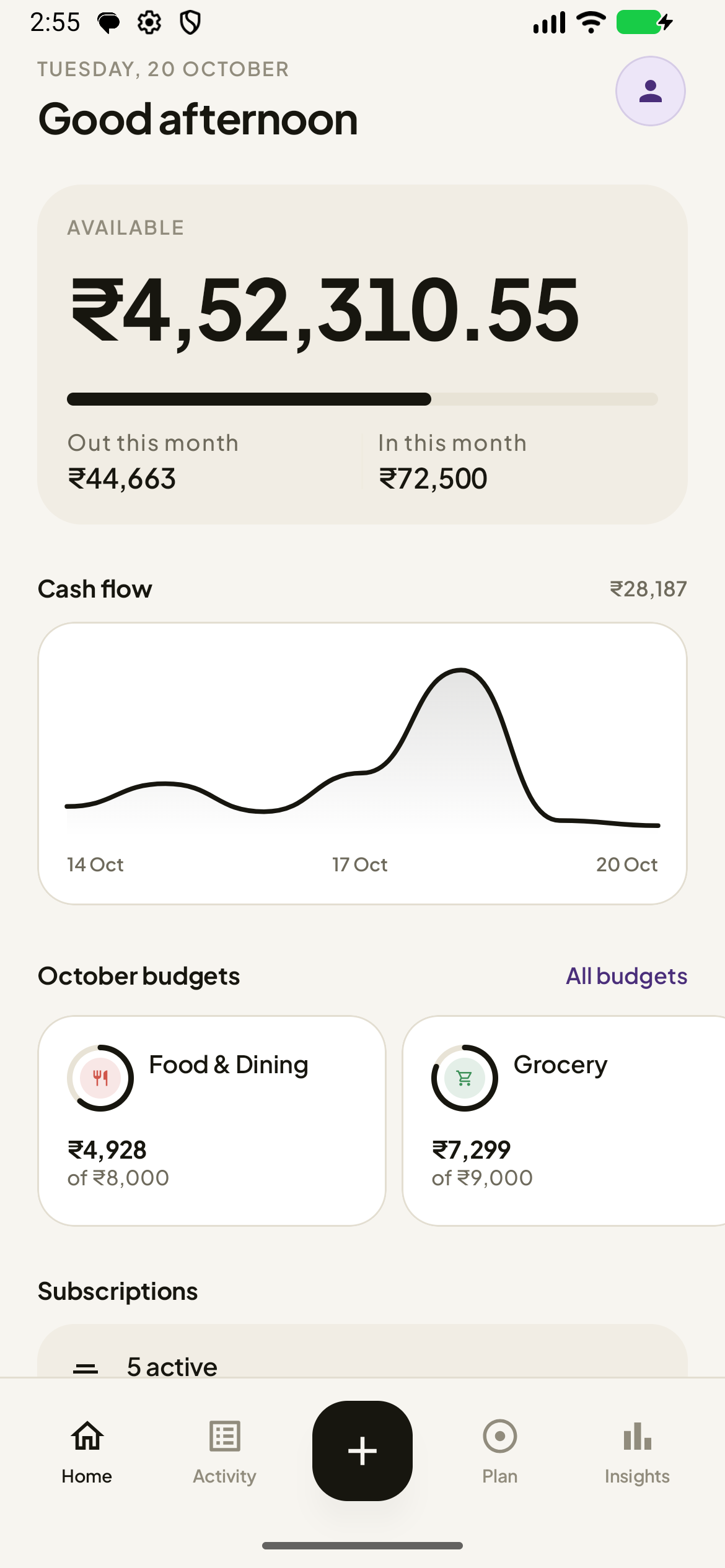
AuraSpend's home screen: the available balance, this month's money in and out, a seven-day cash-flow chart, budget rings, subscriptions, accounts and today's transactions
How it works

Three steps. The third one is you.

AuraSpend never asks for your card number, your net banking credentials or an account with anyone. It reads the SMS your bank already sends, on your phone.

1 · The message arrives
HDFC Bank Today, 20:14

Rs 640.00 debited for UPI to SWIGGY on UPI. Reference number 523144776210. Avl Bal Rs 24,180.55

Sender ID HDFCBK — the one piece of routing metadata your phone already has, and the reason a bank-specific parser can be trusted with the numbers.

2 · Parsed on your phone
Direction
Debit
Amount
−₹640.00
Merchant
Swiggy
Category
Food & Dining
Parsed by
HDFC parser
3 · In your ledger
Swiggy Food & Dining · 8:14 pm −₹640
Uber Transport · 8:41 pm −₹245

Swipe right to save₹2,28,588

No scraping, no linking

AuraSpend never connects to your bank. It reads the same message you already read, with read-only access to your inbox. It cannot send an SMS and never asks for banking credentials.

54 parsers, and a fallback

The sender ID picks the parser that knows that bank's format — 54 of them, covering banks, cards, wallets and payment apps. Anything else falls back to a general engine.

Nothing written yet

A parsed transaction waits in a review queue. It reaches your ledger only when you swipe it there, and you can undo that in one tap.

Review first

Nothing is saved without your say.

Most money apps guess and move on. AuraSpend shows you exactly what it read, and waits.

  • Messages it cannot read are kept. If a message carries an amount and a movement verb but no parser claims it, it goes to a review list with its raw text — never into the bin.
  • Skipped messages stay visible. Every message it skips is listed in Smart Add, with a “Classify again” button, so a parser fix reaches back and re-queues it.
  • The model cannot delete your money. A transaction is discarded only when the parser found no amount and the on-device model is certain it is not one. The shipped encoder has never done that to a real debit.
34 messages found Categorising 12 of 34
Salary credited Income · HDFC Bank · 9:02 am
Uber India Transport · 8:41 pm
Amazon Pay Shopping · 7:12 pm
Swipe right to save · left to dismiss Skipped (4) — messages it could not read
The app

Everything you need, and none of the noise.

Every feature below ships in every build. There is no paywall, no premium tier and no in-app purchase.

Activity

Find anything, fast.

Every transaction you have kept, in one scrollable ledger — grouped by day, with the net amount for each day in the header.

  • Search by merchant or note, always visible at the top.
  • Filter by direction and by category, with each category in its own colour.
  • Step through months, and switch between newest and oldest first.
  • Swipe a row away to delete it, with undo.
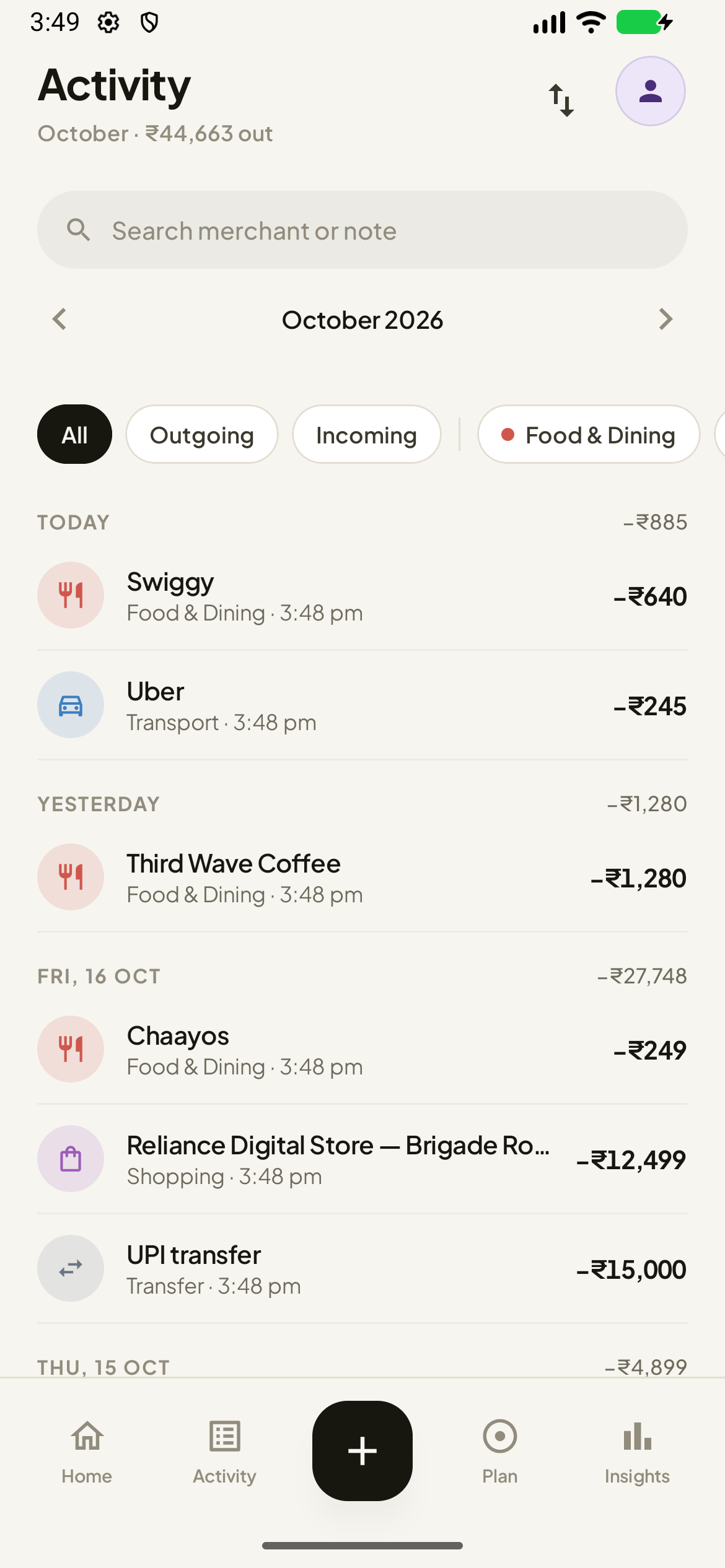
The Activity screen: a search field, category filter chips, a sticky day header with the day's net amount, and transaction rows
Plan

Budgets, subscriptions and goals, in one place.

A budget for every category you care about, and a single screen that says plainly whether you are over.

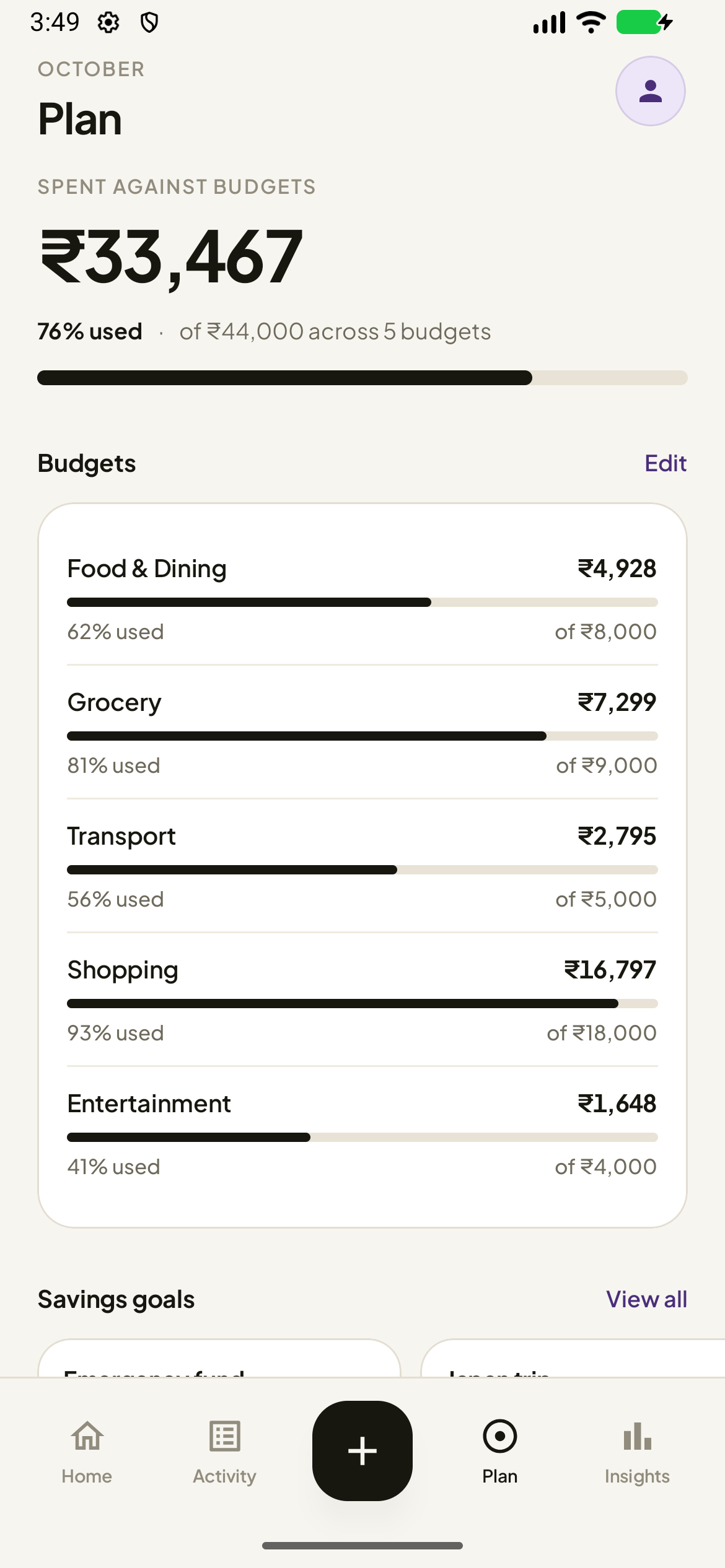
  • Per-category budgets, shown as bars you can compare by length, with the real percentage — “122 % used”, never a clamped 100 beside a larger number.
  • Savings goals with a target amount and an optional date.
  • Subscriptions you track, plus the recurring payments AuraSpend has spotted in your messages — offered to you, never added silently.
  • The count on Plan is the count on the screen it links to.
The Plan screen: money spent against budgets, a usage bar, and per-category budget rows
Insights

See where it actually went.

A ranked answer to “where did the money go”, and how this month compares with the last one.

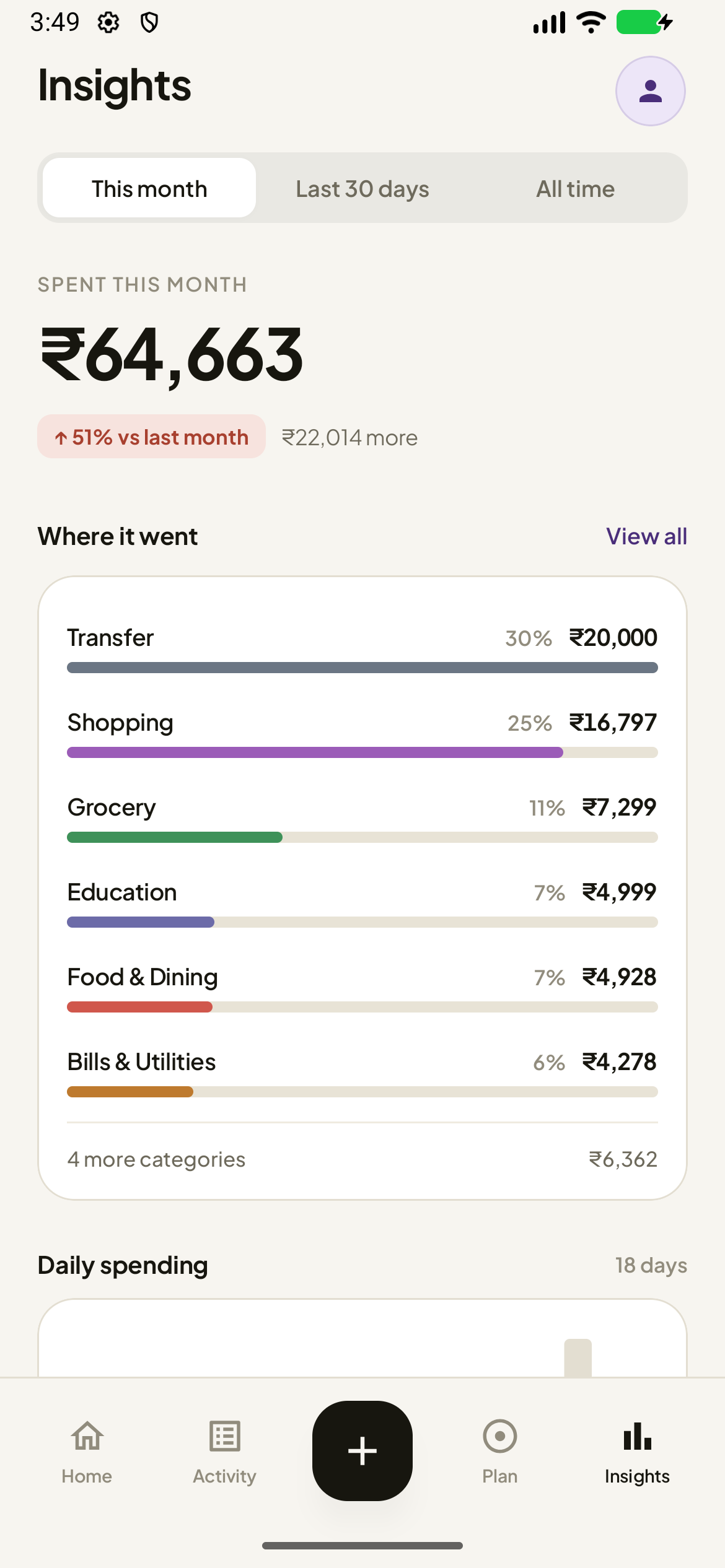
  • Spending by category, ranked, with the tail summarised rather than hidden.
  • Daily spending across the period you chose — this month, the last 30 days, or all time.
  • Your top merchants, with a count of how many times you spent there.
  • Tap any category or merchant to jump straight to the transactions behind it.
The Insights screen: total spent for the period, a change against last month, spending by category and top merchants
Quick Add

An expense in seconds.

For the things that never arrive by SMS — cash, a card paid in person, a shared bill.

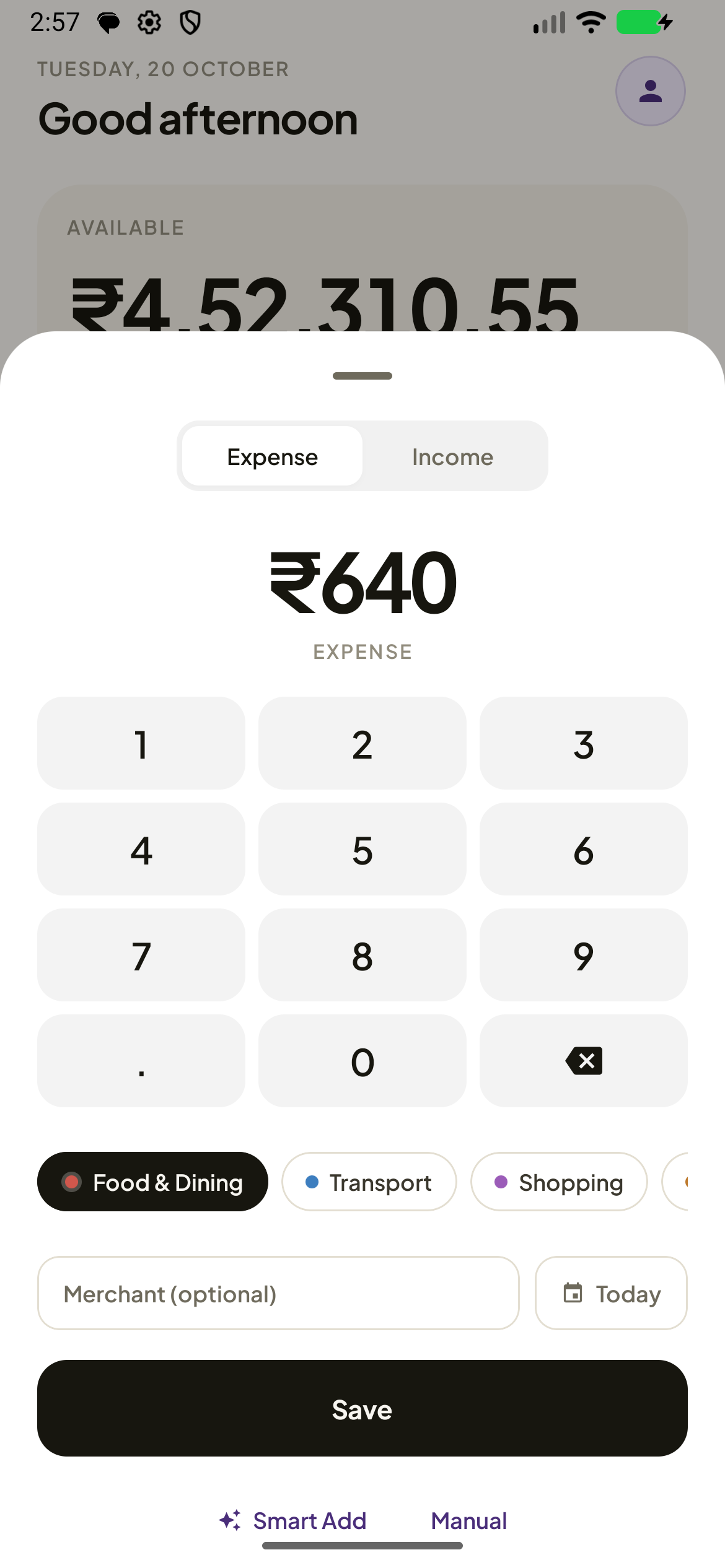
  • A keypad with haptics, a category row, and merchant and date on one line.
  • The sheet opens expanded, so Save is never below the fold.
  • Smart Add and Manual are one tap away, not buried in a menu.
The Quick Add sheet: a large amount display, a numeric keypad, category chips and a Save button
Your data

Yours to take out, and yours to keep.

You should be able to leave whenever you want, with everything intact.

CSV in and out

Export every transaction to a CSV file, or import one back. Re-importing is duplicate-checked, so a file you bring in does not double your history.

Drive backup

Keep a copy of your ledger in your own Google Drive and restore it on another phone. Nothing is uploaded unless you start a backup yourself.

App lock

A four-digit PIN, and optionally your fingerprint or face. The PIN is stored as a salted hash, never in plain text — and there is no back door.

Privacy and security

Your money data stays on your phone — unless you ask it to leave.

AuraSpend has no account, no server that holds your data, and no analytics, advertising or crash-reporting SDK in any build.

Everything AuraSpend can send over the network, and exactly when.
On the device Off the device
Transactions, categories, budgets, goals and subscriptions A Drive backup you start — one JSON file, in your own Drive
Your bank messages, and the queue of what it read The optional 22 MB categoriser — a file request that carries no message content
The categorisation model and its vocabulary, once downloaded Nothing else. The app has no server of its own.

Encrypted at rest

Your database is encrypted with SQLCipher, using a key derived from a non-exportable key in the Android Keystore. There is no fallback to plain text — the app refuses to open rather than open in the clear.

Scrubbed before it is stored

Phone numbers, UPI references, UTRs, folio ids and hash-like tokens are masked out of the message queue, the notes and the exports — while the amount, the date and the bank's own card mask survive, so the app still works.

Android's own backup is off

The database, the preferences and the model directory are excluded from both cloud backup and device-to-device transfer. A backup is something you start, not something that happens to you.

Read the full privacy policy

Open source

Free software, under the AGPL.

AuraSpend is licensed under the GNU Affero General Public License v3.0 or later. You can read every line, build it yourself, and change it.

The AGPL means that if you distribute a modified AuraSpend, your version stays under the same licence — and if you run a modified version as a network service, you must offer its source to the people who use it.

Every significant decision in this project is written down as an architecture decision record, and the reasoning behind each release is published as a handoff. The privacy claims on this page are checkable, not just trusted.

Bank parsers
54

Sender-routed parsers for banks, cards, wallets and payment apps.

Exact match
97.6 %

On the 82-case classification corpus, with the model switched off.

Unit tests
709

Run on every commit, plus lint, licence and privacy gates.

Trackers
0

No analytics, advertising or crash-reporting SDK in any build.

The model is optional. The parsing layer alone is what gets those numbers, and the app is fully functional without ever downloading it.

Get AuraSpend

Three ways to install it. One app.

Every build is the same code with the same features. The only differences are where it comes from and which optional Google services it carries.

GitHub Releases

The signed APK, and the signed app bundle. Available now, with a SHA-256 checksum for every file.

Download the APK Android 11 and later · no Google services required

Google Play

Free on Google Play. This build adds Drive backup and an in-app update check.

Live Get it on Google Play Free · Android 11 and later

F-Droid

Submitted. This build ships without Google Play Services, so it has no Drive backup and no in-app update check — everything else is identical.

Submitted Tracked in the F-Droid metadata repository.

Prefer to build it yourself? Here is how — it is the same app either way.

Questions

The short answers.

Do I need an account?

No. There is no AuraSpend account, no sign-in and no server. Install it, grant read access to your SMS if you want automatic tracking, and it works.

Does it connect to my bank?

No. It never asks for a card number, a customer ID, a net banking password or an OTP. It reads the same SMS you already read, and it cannot send an SMS.

Does it work without internet?

Yes. Parsing, categorisation, budgets, goals and insights all run on the device. Day-to-day use needs no connection at all.

Is it really free?

Yes — no ads, no trackers, no accounts, no paywall and no in-app purchase. Every feature is in every build, and the source is open under the AGPL-3.0.

Read all the questions

Start here

Take control of your spending.

Download the signed APK, or build it from source — it is the same app either way. Your bank messages stay on your phone until you say otherwise.